
BCP-2 Collar Release Programmer
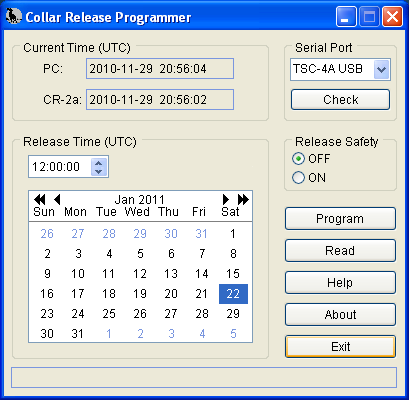
The Collar Release Programmer software allows you to set and view the operational parameters of the Telonics CR-2a Collar Release. The Collar Release Programmer provides you with the capability to set the CR-2a release parameters in preparation for a deployment. For those situations in which the study doesn't go quite as planned, the Collar Release Programmer can also be used to deactivate a CR-2a prior to its release date/time, allowing the CR-2a to be stored safely and used at a later date.
Download
Download v4.04, 2019.01.14 (Setup-BCP2v4.04.exe 2,935,632 bytes)
USB Driver Installation Instructions
You will need Adobe Acrobat Reader to view the file.
Features
The Collar Release Programmer software allows you to:
- Select the release date using a visual calendar control.
- Specify the release time of day in HH:MM:SS (UTC) format.
- Select the state of the Release Safety mechanism.
- Read and view operational parameters in a CR-2a that has been programmed previously.
Minimum System Requirements
- Operating System: Microsoft® Windows® XP/Vista/7/8/10
- Display: 800 x 600, 256 colors
- Hard disk: 6.8 MB available space
- Ports: One standard serial (COM) port for use with TSC-1 or TSC-3 interface cables, or 1 USB port for use with the TSC-4A, TSC-7A or TSC-9A USB interface cable.
Known problems/issues
- BCP-2 is NOT compatible with CR-1 (all firmware versions), CR-2 (all firmware versions), or CR-2a (firmware version CB010810 or earlier).
Upgrading the Collar Release Programmer software
- Free upgrade available: If you have purchased a license for any version of BCP-1 or any version of BCP-2 software prior to V3.00, you qualify for a free upgrade to BCP-2 V3.00.0009 software. To obtain your new authorization code (required in order to use the software), contact Telonics. You will be required to provide proof of prior purchase. You may submit your current BCP-2 authorization code (serial number), Telonics order number, or Telonics invoice number.
- If you are upgrading from V3.00 to V4.xx, this is a major version upgrade and upgrade fees are applicable. Please contact Telonics for upgrade pricing and purchase of a new authorization code.
- If you are upgrading and have previously purchased a V4.xx license, this is a minor version upgrade and there is no upgrade fee. Simply download the latest setup program and use your current V4.xx authorization code.
- When upgrading, the previous version of this software must be uninstalled before installing the new version. This can be done in the typical Windows fashion (Windows Control Panel | Add/Remove Programs, select the program, and then click the Remove button).
- If you are installing V4.02 or newer for the first time, download the USB Driver Installation Instructions (see link above) and familiarize yourself with the messages and/or hardware wizard pages that will be displayed by the operating system on your computer. Please note that if you will be using a TSC-4A or TSC-7A USB interface cable, you should plug the cable into the computer after the Collar Release Programmer software has been installed successfully.
Version History
What's new in version 4.04?
- Added support for TSC-9A USB cable.
- Now defaults to "TSC-4/7/9 USB", providing automatic support for all three USB cables.
- Now detects CR-5/CR-7 "A" and "B" variants and refers the user to TPP.
- Updated the help system.
What's new in version 4.03?
- Users can now read the CR-2a without an authorization code.
- Collar Release Programmer now defaults to TSC-4/7 USB providing automatic support for both USB cables using the one setting.
- Collar Release Programmer now detects the CR-5 and CR-7 collar release devices during Check, Read, and Program operations and refers the user to Telonics Product Programmer (TPP).
- Removed support for Windows 2000 from the installer.
- Various Help system updates.
What's new in version 4.02?
- Support for the TSC-7A USB interface cable has been added to the program as well as the help system.
- Added a warning dialog that displays if the user tries to program the CR-2a with a release date more than 5 years into the future. The dialog is just a warning and the user can continue programming or abort the operation.
- Added information in the programming confirmation dialog reminding the user that the CR-2a lifetime is 5 years.
What's new in version 4.01?
- Support for the TSC-4 USB interface cable has been added.
- The control that displayed the CR-2a firmware release was removed. Firmware release information is now shown in any error message in which that information would be of benefit.
- Filters have been implemented to detect CR-2a firmware CB011116 and CB020108. These firmware releases were shipped in CR-2a units manufactured prior to April of 2002 and their useful lifetime has expired. For these two firmware releases, the Collar Release Programmer behavior is now as follows:
- Read: The CR-2a release parameters will be read and displayed. You will be notified that the useful lifetime of the unit has expired and that you will not be able to be re-program the unit for a future deployment.
- Program (safety ON): The safety will be programmed ON so that the unit will not release. You will be notified that the useful lifetime of the unit has expired and that you will not be able to be re-program the unit for a future deployment.
- Program (safety OFF): The unit will not be programmed. You will be notified that the useful lifetime of the unit has expired.
- Verified proper program operation running under Windows 7.
- Updated the help system to cover the modifications described above
What's new in version 4.00?
- Support for Windows Vista has been added.
- Support for users operating with a non-administrator level logon has been added.
- Enhanced the Help System. The help system was converted from WinHelp to HTML Help and material was added to support Windows Vista installations.
- Changed the location on the Windows Desktop at which the program starts. Previously in dual-monitor environments, the program would start up split between the two monitors, or centered on the edge of one of the monitors depending on the monitor orientation (1 | 2 vs. 2 | 1). The program now starts centered in monitor 1.
- Updated the program appearance. Windows XP style controls are now displayed when running under Windows XP/Vista.
- Replaced the calendar control due to compatibility issues with Windows Vista. The new control provides Month and Year browse buttons, as well as Month and Year popup menus.
- Eliminated support for Windows 95, 98, 98SE, ME, NT3.1, NT3.5, NT 3.51, and NT 4.0 operating systems. The installer now prohibits installation on computers running an unsupported operating system.
What's new in version 3.00?
This version provides several enhancements.
- Serial communications between the PC and CR-2a under Windows 2000 and Windows XP are now more reliable than in previous versions.
- Added a serial communications check button. This feature checks interface cable and CR-2a connections, and is helpful during the COM port setup process.
- Improved error checking and error message display. Error messages now more accurately reflect the nature of the problem.
- Updated help system. Several sections have been added, improved, and expanded.
- Added a program status bar. In new installations, the status bar prompts the user to enter the program serial number. Under normal use, the status bar is used to indicate active read and programming processes.
- Improved About dialog access. Added a program About... button in plain view. In previous versions, the About dialog access mechanism was hidden in the program's system menu.
- Eliminated serial number entry during program installation. The Collar Release Programmer software now manages serial number entry. This is consistent with other software authored by Telonics.