
Download Utility for Gen2 & Gen3 GPS
Telonics Download Utility ('DU') is a program designed to facilitate the downloading of GPS data stored on board the Telonics Gen2 and Gen3 systems. The data are converted to readable form and files are created. The delimited files can be directly accessed using Microsoft Excel or other spreadsheet programs. The other file format ('aux') may be read using a text editor program.
Screenshot
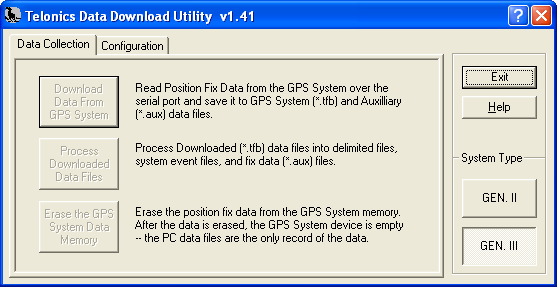
Available for Download
Download v1.41, 2009.11.10 (DU-Setup-1.41.exe, 575,475 bytes)
Download v1.33, 2007.07.23 (DU-Setup-1.33.exe, 3,435,381 bytes)
Features
- Downloads data from Telonics 'Gen2' and 'Gen3' systems.
- Creates comma or tab delimited text files that can be accessed and manipulated using spreadsheet programs and / or other data analysis tools.
- Creates text files with each position fix presented in paragraph form.
- Provides the capability to erase on-board data from the system.
- Runs under Microsoft® Windows® 2000, XP and Vista.
System Requirements
- Intel® Pentium® II 300 MHz or higher
- Microsoft® Windows® 2000/XP/Vista/7
- Available COM port
- At least 30 MB available hard disk space
- Video card capable of 800x600 resolution
Version History
What's New in Version 1.41?
- Added compatibility for use in the Windows Vista operating system.
- Added ability to find available COM ports for use in data download.
What's New in Version 1.33?
- Corrected a comma delimited (.csv) file generation bug that caused the 2D fix data in the 'Latitude' through 'Satellite Data' columns to be offset one column to the left.
What's New in Version 1.32?
- Added the ability to process existing downloaded binary (.tfb) files without the need to re-download data from the device.
What's New in Version 1.31?
- Changed delimited data file extension from 'dat' to 'tsv' or 'csv'. The 'tsv' extension is applied to tab delimited files and the 'csv' extension is applied to comma delimited files.
- The user may select tab or comma delimiters in the 'Configuration' dialog tab frame of the 'DU' program.
- The 'dat' extension was eliminated due to the following: Double-clicking on a file with the 'dat' extension while under the Windows 2000 or Windows XP operating systems brings up a warning message cautioning the user against modifying the file. Windows considers the file extension 'dat' related to system files that should not be modified. Changing the extension to 'csv' or 'tsv' also allows spreadsheets such as Microsoft® Excel® to list these files without looking for 'all files'.